
Call people back one at a time, from your phone
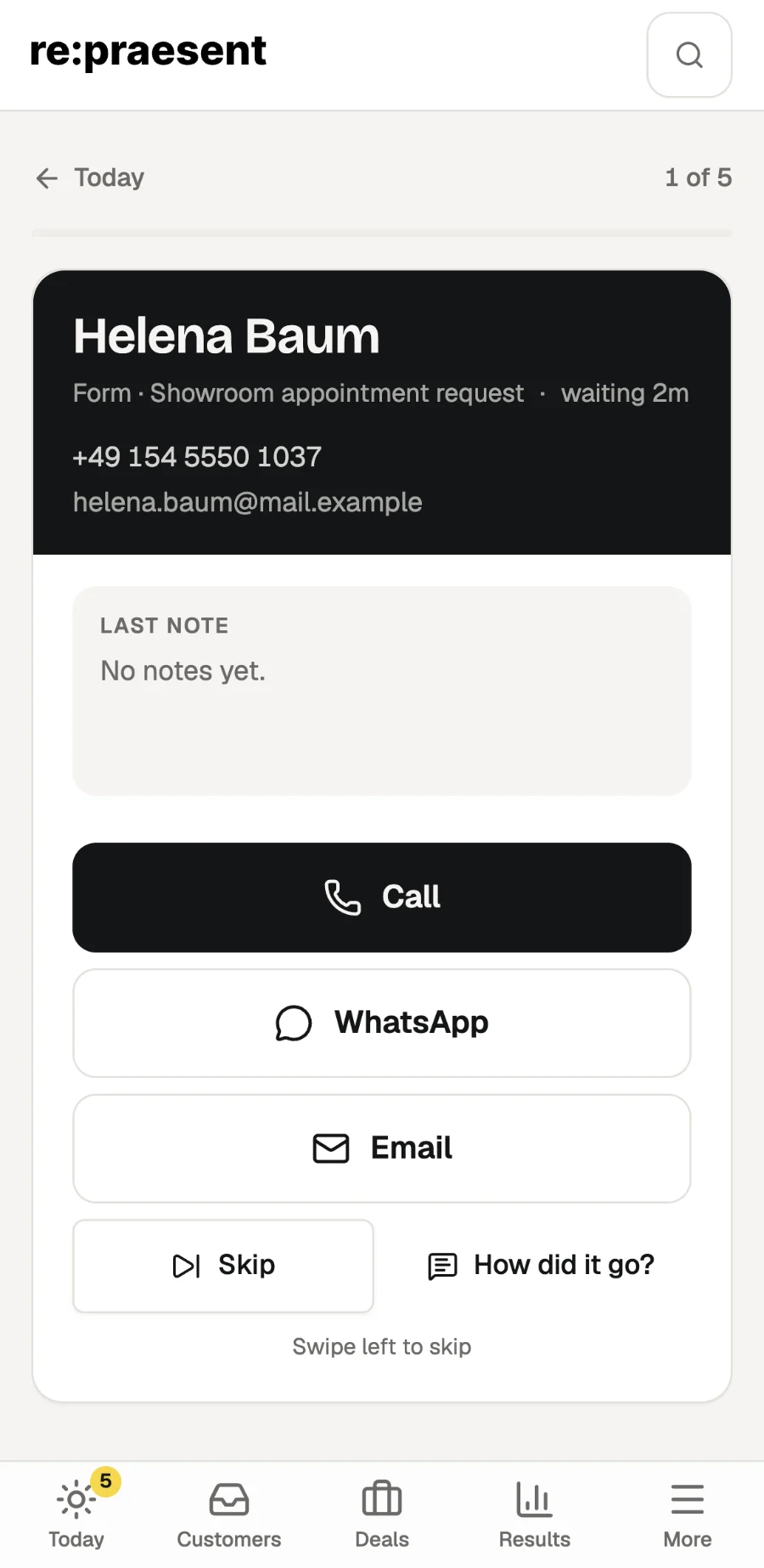
“Go through the list” is a screen in re:praesent, on your phone, that shows the people waiting for an answer one at a time. You call, write on WhatsApp or send an email, then tap how it went, and the next person appears. It turns a pile of call-backs into something you can finish in a break.
Call-backs happen in the gaps
A barber has twenty minutes between two customers. Four people asked about appointments since the morning. He knows he should ring them.
What usually happens is this. He opens the list, calls the first, gets no answer, and puts the phone down. Later he cannot remember whom he tried and whom he did not.
The calls are short. Keeping track of them is the part that goes wrong.
What the list does
On the Today page on your phone there is a button: “Go through the list”, with the number of people waiting. Tap it.
- You see one person. Their name, where the inquiry came from and your last note about them.
- Three buttons: Call, WhatsApp, Email. If there is no phone number or email on file, the app says so.
- People you promised to call again come first. New inquiries follow, in the same order as on Today.
- “Skip” moves to the next person without recording anything. You can also swipe left.
- A counter at the top shows where you are, for example “3 of 8”.
The list is fixed when you start. New inquiries that arrive while you are calling do not reshuffle it. They wait on Today.
“How did it go?”
After each attempt the app asks one question with four answers.
- Reached them. The app then asks what is next. You can turn the inquiry into a deal, or leave it.
- No answer. You pick a day to call again and the app reminds you on that day.
- Not interested. The inquiry moves to your closed inquiries. Nothing is deleted.
- Fake or spam. The inquiry is hidden and the sender is blocked. You can undo it.
You can add a note. If your hands are full, tap “Say how it went” and speak for up to a minute. The app writes it down and fills in the form. Nothing is saved until you tap Save, so you can correct it first.
When you reach the end, a summary shows how many people you reached, how many did not answer and how many you skipped. Anyone you skipped is still on Today.
What it does not do
It does not make the call for you. Tapping Call opens your phone’s own dialler, and WhatsApp opens WhatsApp. re:praesent does not record or listen to calls.
The button for the list appears on phones. On a computer you work from the Today page, where each row has the same Call, WhatsApp and Email buttons and the same question afterwards.
One run holds up to 50 people. Voice notes have a daily limit, and typing always works.
What it costs
It is part of re:praesent, which costs €300 a year or €30 a month. Everything is included and there is no fee per user. The pricing page has the details.
If you want to see it on your own phone before deciding, ask us for a short call.
Questions
Do I need to install an app for this?
No. It works in the browser on your phone. You can also put re:praesent on your home screen so it opens with one tap.
What if I skip someone by mistake?
Nothing is lost. Skipping records nothing, and the person stays on the Today page until you record how it went.
Does the customer see that I use a list?
No. They receive a normal call, WhatsApp message or email from you.
Can two people in my team go through the list at the same time?
Yes. Each person runs the list from their own phone, and it holds the people who are waiting on them.