
Name the steps of your deals the way your business works
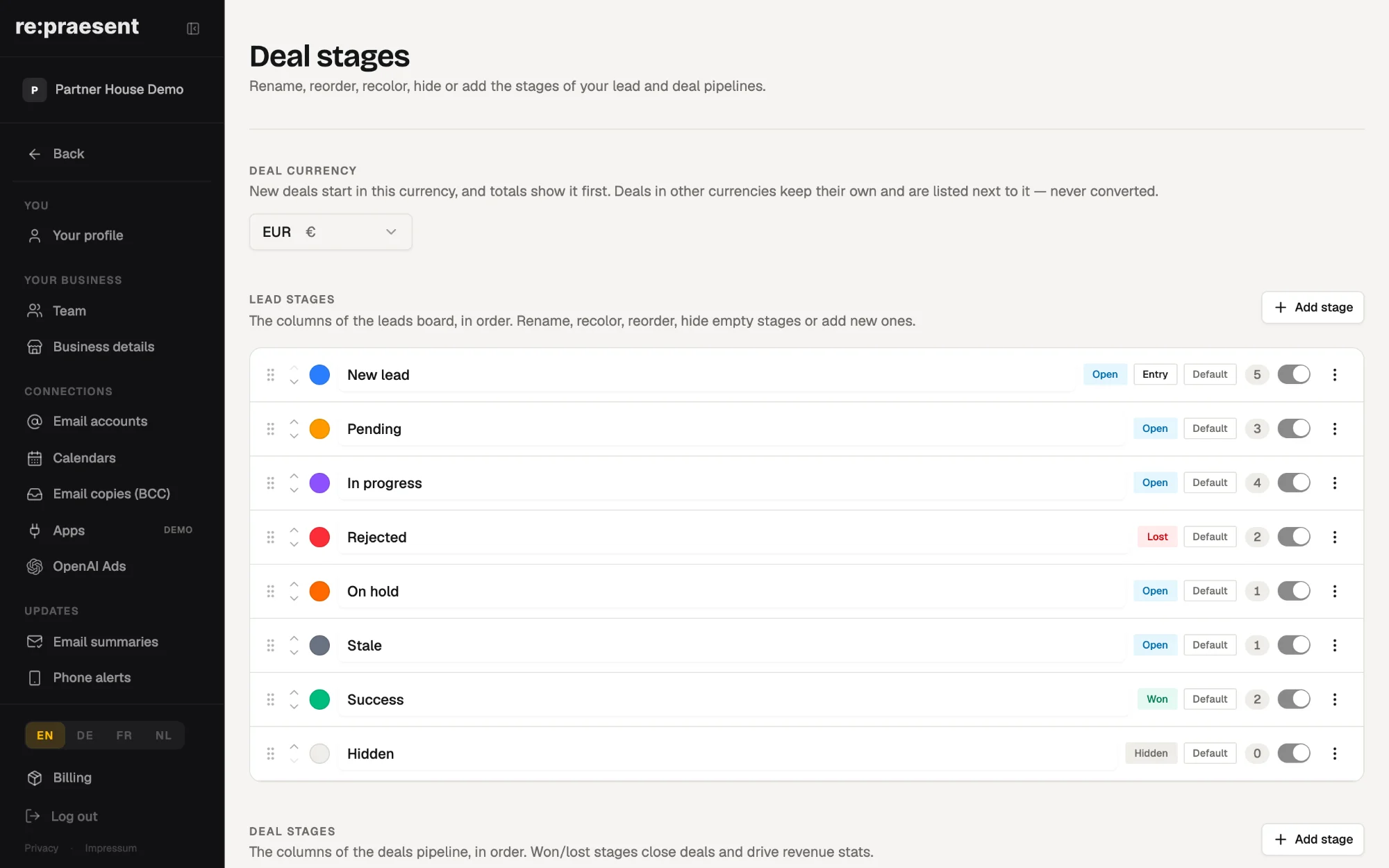
In re:praesent you decide what the stages of an inquiry and of a deal are called, what colour they have and in which order they appear. The board then matches the way your business really works, from first contact to paid job. A new business starts with four deal stages: New, In progress, New customer and Didn’t happen.
When the labels do not fit, people stop moving the cards
A shop, an electrician and an online store do not take the same steps from inquiry to paid work.
The electrician visits the site, writes an offer, waits, then schedules the job. The kitchen studio measures, plans, presents and orders. A board that offers both of them the same fixed columns fits neither.
What happens next is predictable. Staff invent private meanings for the columns. One person uses In progress for offers sent, another for jobs started. Or they stop moving the cards at all, and the board no longer shows the truth.
What you can change
Inquiries and deals each have their own list of stages. For each list you can:
- Rename a stage in your own words, such as Site visit done or Offer sent.
- Give it a colour.
- Drag the stages into the order you work in.
- Add a stage you need.
- Hide a stage from the board when it is empty and in the way.
- Choose which stage a new inquiry enters first.
The board and the page of each single deal use the same list. Change a name once and it is changed everywhere.
How the end of a deal is counted
Every deal ends in one of two ways. Either the person becomes a new customer, or it didn’t happen.
You can rename these end stages too, but each keeps its type. A stage of the new customer type closes the deal and adds its value to what you earned. A stage of the didn’t happen type closes it without. This is how the Results section can show plain numbers without anyone filling in a report.
How it works day to day
- An admin opens Settings, then Deal stages.
- They rename, colour and order the stages for inquiries and for deals.
- Everyone else works the board as before, moving each deal to its next stage.
Only admins can change the setup. Team members with editing rights can work with the board but cannot rearrange it. That keeps the board stable: nobody finds a column gone on a Monday morning.
Hiding a stage does not delete anything. The history of every inquiry and deal stays.
What it does not do, and what it costs
Stages describe where a deal stands. They do not do the work. A deal still needs a next step, a call or a visit, and someone to do it.
We suggest keeping the list short. Five clear stages that everyone uses the same way tell you more than twelve that nobody agrees on.
It is part of the re:praesent package: €300 a year or €30 a month, everything included, with no fee per user. The full list is on the pricing page.
Questions
Which deal stages does a new business start with?
New, In progress, New customer and Didn’t happen. You can rename, reorder and add to them.
Can inquiries and deals have different stages?
Yes. They are two separate lists, each with its own names, colours and order.
Who is allowed to change the stages?
Only admins. Team members with editing rights can work the board but cannot change its setup.
Do I lose history when I hide a stage?
No. Hiding removes the column from the board. The history of inquiries and deals stays.
How does the app know what I earned?
A deal moved to a stage of the new customer type is closed and its value counts towards what you earned.