
One login to see how all your partner stores are doing
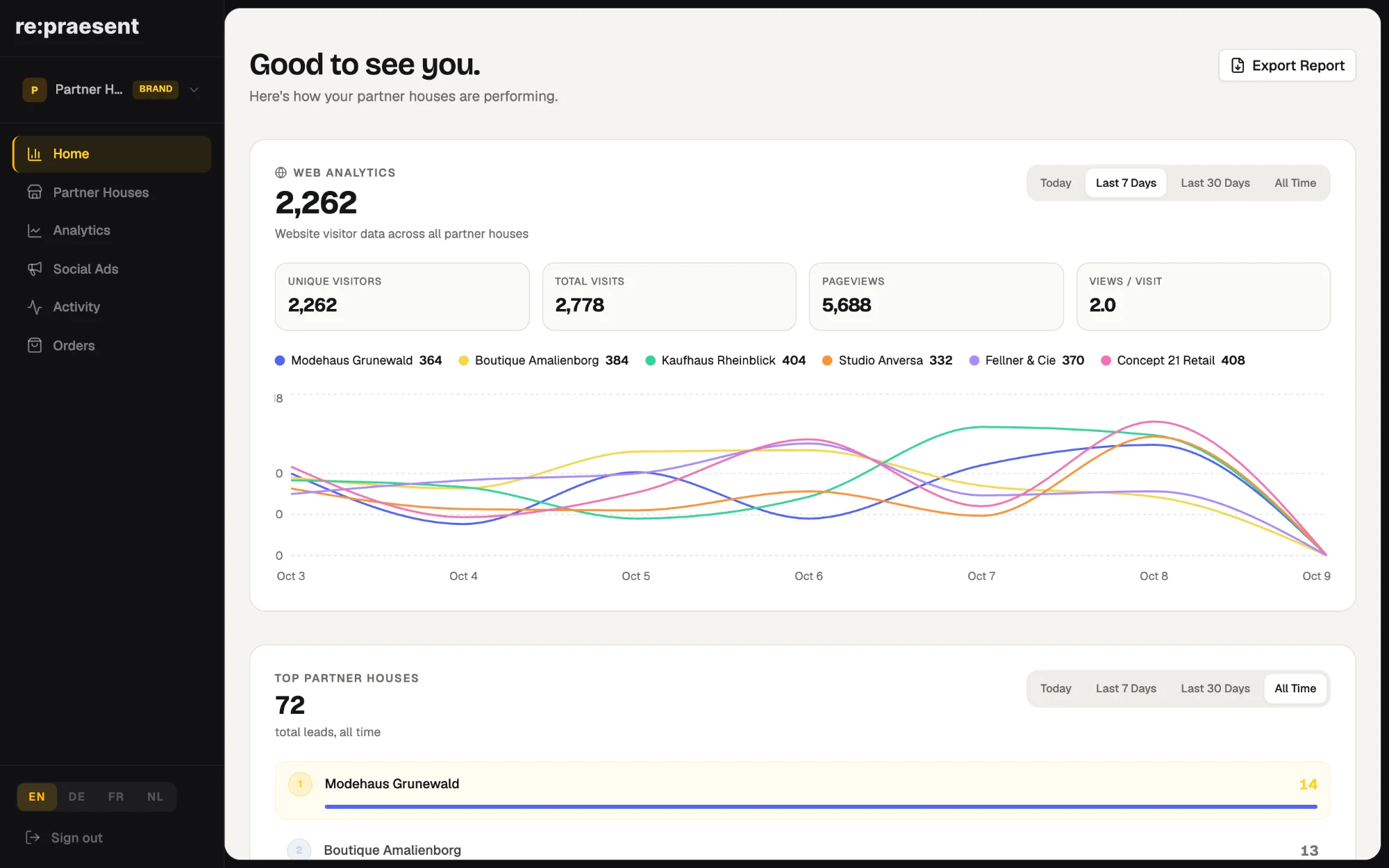
The brand login in re:praesent gives a brand one place to see its whole network of partner stores: website visitors, advertising campaigns, inquiries and the status of each location. It is made for brand and channel teams who today collect these numbers from emails, agency reports and spreadsheets.
The weekly hunt for numbers
A brand sells through dozens of independent stores. On Monday the channel manager wants to know how last week went.
So the collecting begins. An email to the agency for the campaign report. A message to each store owner asking how many inquiries came in. An export from one system, a spreadsheet from another. By the time the picture is complete, it is a week old.
Logging into every store’s own account is not a real option either. There are too many, and those accounts belong to the retailers.
What the brand login shows
We released the brand view in March 2026. It is a separate login built for the brand team. It is not a cut-down copy of what a store sees.
- Website visitors across all partner stores, with unique visitors, visits and page views.
- Inquiries from website forms and from appointment bookings, shown as two separate charts.
- A ranking of the partner stores with the most inquiries.
- Google and Facebook campaigns across the network.
- A list of every partner store with its products, recent activity and team.
- An Excel export of inquiries across every location.
You choose the period you want to look at: today, the last 7 days, the last 30 days or all time.
How a brand team uses it
The Home screen comes first. It answers the first question of the week: how are our stores doing.
From there you go where the numbers send you. A store with no recent activity is worth a phone call. A campaign that costs more than the others is worth a second look. A list of inquiries for the agency or for management is an export away.
The point is that nobody has to ask a retailer for access, and nobody waits for a report to be put together by hand.
What stays with the retailer
Each partner store keeps its own login and its own view of its customers. The store works its inquiries and deals as before.
The brand login is for seeing the network. It does not take over the daily work of a store, and it does not replace the conversation between a brand and its partners. It gives that conversation facts.
Is it right for you
It fits brands, franchise systems and buying groups whose locations each run their own website and their own customer list. If that describes you, the pages for brands and for retailers and franchises explain the set-up. Because every network is different, we talk it through with you first. Arrange a conversation and we will show you the brand login with real screens.
Questions
Do I need a login for every partner store?
No. The brand login shows all connected partner stores in one place.
Can retailers still use their own account?
Yes. Each store keeps its own login and works with its own inquiries and customers.
Can I export the data?
Yes. Inquiries across the network can be exported to Excel, for example to share with an agency or with management.
Which advertising platforms does it show?
Google and Facebook campaigns across the partner stores.